OpenAI is introducing Dots: “a whole new way to work with AI” powered by GPT-6 Astra
Dots are remarkably capable, always-on agents built to handle everything. They’re a whole new way to work with AI—one that gets to know what matters to you, is always working on your behalf, and takes important work off your plate so you get more of your time and attention back.
Dots are frontier intelligence that have your back. Powered by GPT‑6 Astra, they have their own cloud computer, learn from feedback over time, and can work towards your goals 24/7. Through our ecosystem of plugins, they can readily connect to over 4,000 apps, giving them the tools to help wherever you need them.
Your dot is always within reach, whether it is through ChatGPT, Slack, or Teams. You can ask questions, explore ideas, and give feedback along the way; or you can simply hop on a voice call when you need to talk something out. The more you work together, the more your dot learns your preferences, how you think, and what good looks like to you.
The magic of dots is when they bring you work done the way you would do it, sometimes before you even think to ask. With dots alongside you, ambitious ideas and projects you haven’t had the time or support to pursue start to feel achievable.
Inside OpenAI, we’re getting a glimpse of what work looks like when intelligence is always working by your side. A bug appears in Slack, and dots immediately start investigating. A new design arrives, and dots turn it into a working app while the team focuses on customer feedback. A planning cycle gets underway, and dots keep everyone moving in sync toward the deadline. Outside OpenAI, an early tester’s dot noticed he’d forgotten to invoice a publication, prepared the invoice, and sent it after his approval.
Today, you can start with your primary dot, give it a name, and make it your own. Over time, we envision teams of dots working together on your behalf. We’re beginning to roll out dots across Pro, Business Premium, and Enterprise plans in eligible markets. We plan to expand dots to more users soon. We’re also sharing a preview of specialist dots with their own identity for access management, IT-provisioned hardware, and support for deep integrations with a company’s systems of record to allow them to take on well-defined responsibilities inside organizations.
Dots can work on their own
Dots can do nearly anything using their own cloud computer, their own browser, and the apps you’ve connected.
You can open your dot’s computer at any time to inspect its work. Dots can connect to other devices in addition to their own and you can also give your dot permission to connect and use your laptop, where it can then be useful directly alongside you.
Your dot can take a project and run with it, even while it’s working on several others. You can keep bringing it new tasks and ideas without having to juggle separate threads or direct every step.
Dots are an extension of you
With a dot that knows your goals and standards, you can take on more without directing every step. Here’s what that looks like:
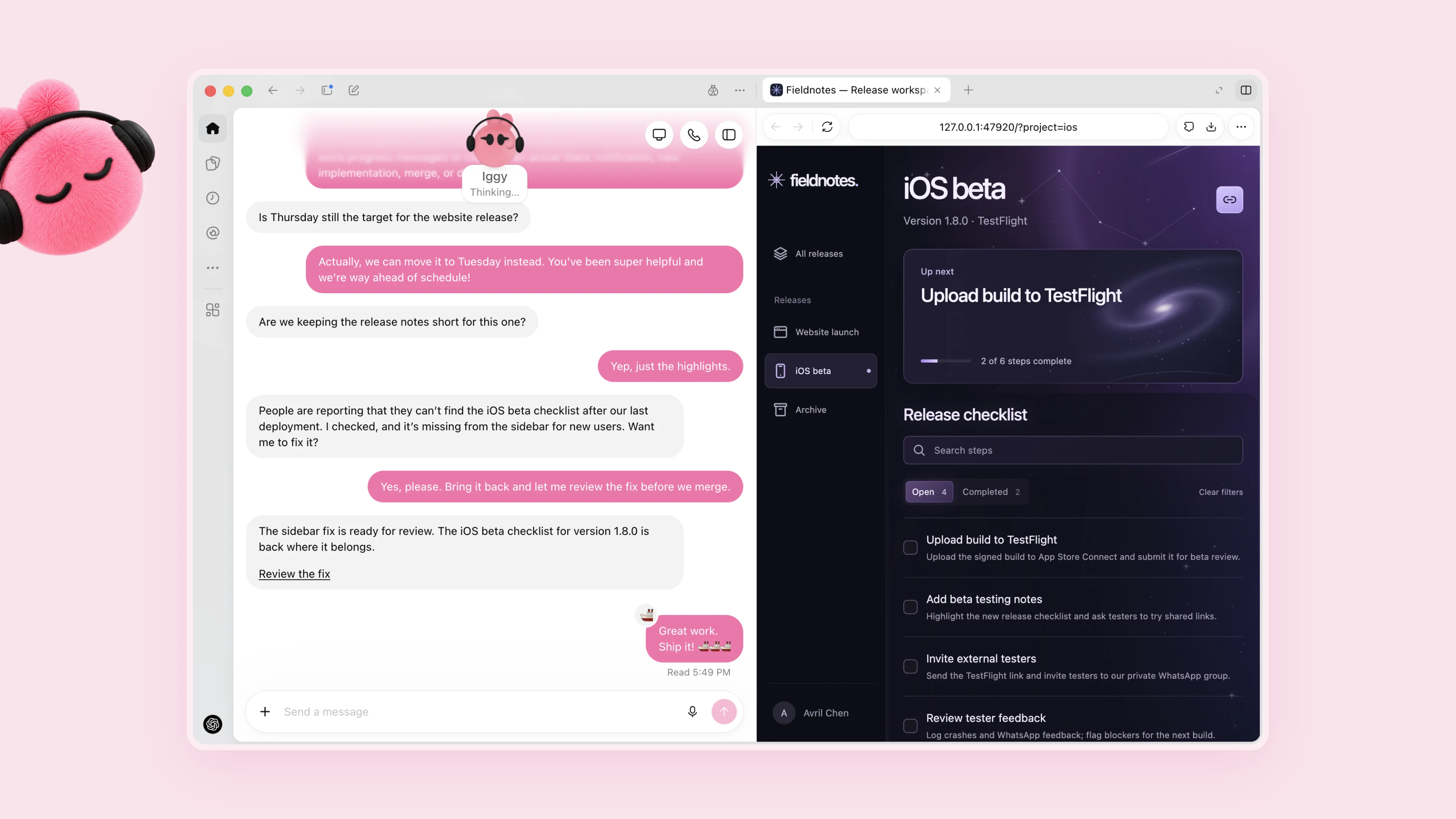
Turn feedback into tested fixes
You’re a developer working on an app. Your dot watches customer feedback for recurring requests, scopes smaller improvements and bugfixes, builds and tests them, and brings you complete PRs to review with attached videos showing the changes. You can keep building the next major feature while reviewing the fixes and improvements your dot prepares.
Action Review and Approval
Dots agents use automatic review to evaluate actions that could affect your accounts or disclose information, based on your instructions, Custom Instructions, and safety requirements. This determines which activities can proceed, which require approval, and which actions you need to complete yourself. Certain sensitive tasks, such as changing a password, always remain your responsibility.
You can learn more about our approach to the safety of Dots agents in our blog post on Dots agent safety, the Help Center, and the system card. Dots agents can still make mistakes, so always review the results of activities with significant consequences.
Specialized Dots Agents for Your Organization
Your Dot works on your behalf; specialized Dots agents take on specific responsibilities within your organization. Your company configures each Dot with its own identity, credentials, and access to the systems it needs to perform its tasks. As it works, the Dot adapts to new information and improves its performance based on feedback from your team. We are building on lessons learned from initial tests conducted within OpenAI in areas such as procurement, invoice processing, email marketing, customer support, and commercial contracts.
We are starting with company pilots focused on well-defined activities. Our engineering teams will work directly with organizations to define each Dot’s responsibilities, the tools it can use, and how people review and approve its work. If there are activities you would like a specialized Dot to take on, we would love to hear from you.
Start Using Dots
Starting today, Dots agents are gradually becoming available in ChatGPT to Pro and Business Premium users in eligible markets. Enterprise users (including Edu and Healthcare) can try the beta after their workspace administrator enables it.
Your first Dot is included with your Pro or Business Premium plan at no additional cost. It is available around the clock to chat with you, help you develop your ideas, and keep track of what matters to you. Your plan also includes resources for more intensive activities, with expanded limits during the first month after launch. In the future, you’ll be able to add more Dots and increase each one’s productivity, either by making it faster or by increasing the total amount of work it can handle each month.
Conversations with your Dot do not count toward your ChatGPT usage limits. When you ask your Dot to start or manage tasks in Codex or ChatGPT Work, those tasks count toward your usage limits as usual.
To get started, create your first Dot in the ChatGPT desktop app or in a browser on your computer, connect your apps, and let it introduce itself. After the initial setup, you’ll be able to message it from the ChatGPT mobile app.
More details here: Introducing dots
Related article: Near-Astra intelligence for a fifth of the price